
Almost any app in Android Auto
Apple Music, Spotify and YouTube Music get the EQ as they start. Players like SiriusXM and iHeartRadio are found by listening, about a second after the music starts.
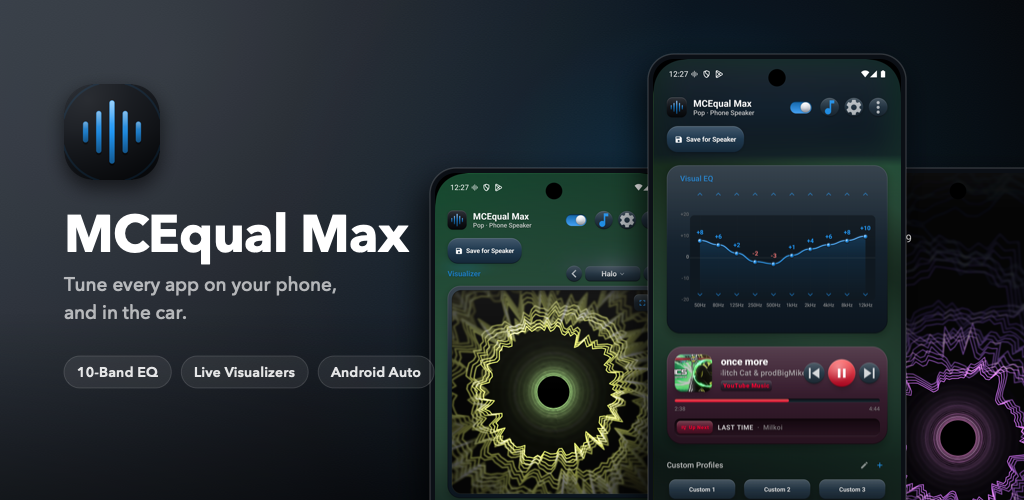
Tune every app on your phone, and in the car. A proper 10-band equalizer with visualizers, synced lyrics and a preset for every pair of headphones, speaker and car.

Tap a screenshot to see it full size.


Ten bands from 50 Hz to 12 kHz on everything your phone plays. Start from one of 34 presets or your own, then add Bass, Treble, Gain and Balance on top.


24 visualizers, from classic bars to early-2000s style, and lyrics that scroll in time with the song, on the dashboard and in fullscreen. Radio stations get them too.

The same visualizers work as a live wallpaper, as a screensaver while your phone charges, and as home-screen widgets that show the live preset.


Glass, skeuomorphic, both, or the classic flat style, with your accent colour, Pure Black for OLED screens and a flowing album art background. Choose what the dashboard shows, and where.

Sync presets to car sends your presets through your Google account, so MCEqual AAOS on your car's screen can import them.
Apple Music, Spotify and YouTube Music get the EQ as they start. Players like SiriusXM and iHeartRadio are found by listening, about a second after the music starts.
Press play in any app and the EQ comes on by itself, with its notification, without opening the app. In Android Auto too.
Per-App Auto EQ switches as you change apps, and every pair of headphones, speaker, DAC and car keeps its own preset.
Every built-in preset has a tuning for the phone speaker, one for headphones and one for factory car speakers. Automatic picks the right one.
Pick from thousands of measured headphones to even out their sound, and get offered a correction when known ones connect.
Distortion Protection turns each built-in preset down by its biggest boost in Android Auto, so loud songs stay clean through the car's speakers.
Music, podcast and movie presets, each with an icon and colour you can pick out at a glance, and three tunings: phone speaker, headphones and car.
 Default
 Bass
 Pop
 Rock
 Hip-Hop
 Vocal
 Loudness
 Highway
 V-Shape
 R&B
 Rap
 Latin
 Dance
 EDM
 Electronic
 Disco
 Metal
 Country
 Acoustic
 Jazz
 Classical
 Lo-Fi
 Clear Voice
 Deep Voice
 Bright
 Highway Talk
 Audiobook
 Remote Guest
 Cinema
 Action
 Sci-Fi
 Musical
 Dialogue
 Night Mode
MCEqual Max runs on Android phones, foldables and tablets, and on Googlebooks.
| Android | Android 9 or newer, the oldest version Android Auto supports |
|---|---|
| Android Auto | Yes, wired or wireless |
| Screens | Phones upright or sideways, foldables inside and out, tablets and Googlebooks |
| Languages | English, Arabic, Chinese, French, German, Hindi, Italian, Japanese, Portuguese, Russian and Spanish |
| Microphone access | Only reads the sound your phone plays, for the visualizer and synced lyrics. Nothing is recorded. |
| Lyrics | From lrclib.net. Only the song's title, artist and length are sent. |
The same Google Play listing installs MCEqual Max on your phone and MCEqual AAOS on cars with Google built-in.
MCEqual AAOS puts the same presets on the car's own screen.